Mechanical Design 101
  • BLOG
  • VIDEOS
  • SHOP
    • Specialty items
    • Books
    • Mobile Apps
    • Software
  • RESOURCES
    • MACHINE DESIGN
    • LINKAGE DESIGNS
    • ENERGY AND ENVIRONMENT
    • DESIGN INNOVATION
    • ROBOTICS
    • Smitty and the Professor
    • Lecture Notes
    • CREATIVE
    • Need Help?
    • Uncategorized
  • ABOUT
    • Need Help?
  • Click to open the search input field Click to open the search input field Search
  • Menu Menu
  • Shopping Cart Shopping Cart
    0Shopping Cart
screenshot

MechGen FG App Makes Design Calculations Easy

October 6, 2014/0 Comments/by Chris McCarthy

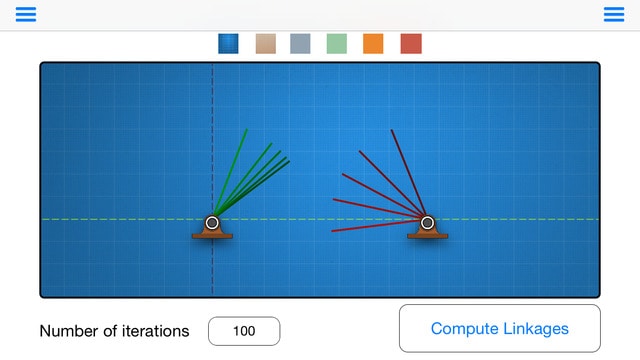
The MechGen iPad App helps you design a link that connects an input crank to the coordinated rotation of an output crank. Locate the two cranks and define their input and output angles and let MechGen FG design linkages for you. The design data and an animation of your linkage is easily distributed by email.

The use of linkages for calculation dates back to Charles Babbage’s “difference machine” from the mid 19th century. One hundred years later, Svoboda designed mechanical computers to direct artillery by fitting the input-output properties of linkages to a desired function.  In 1954, Freudenstein used the newly developed digital computer to find a simple linkage that computed complex functions. This introduced computer-aided design by numerical solution of polynomial synthesis equations derived from linkage loop equations.

Today the design algorithms for six and eight bar function generators push the limits of computational ability.

MechGen FG helps the designer because it repeatedly makes routine calculations that would otherwise be very difficult, and it creates many candidate designs, which is where computational power comes into play.

mechgen design problem-trashcan-lid

An example design that the MechGen app will solve for you is that of a trashcan lid connected by a link to a foot pedal designed to open it. You want the lid to open 100 degrees so that it creates a large opening for you to put trash in it without the lid getting in the way of the entrance (because that is an annoying thing for people to deal with and this is a concern with this product) and being over 90 degrees will allow it to rest or stay open instead of falling back down and closing, but you also don’t want a person to have to move the pedal over too big a distance; you want the pedal to only move 20 degrees so it’s easy for a person to do.

This is a nice design problem.  How do you get a lid to swing 100 degrees when you move a pedal 20 degrees?  Well, you can start with the MechGen FG App.
mechgen-fg-design-app

Find out more on iTunes. This app is a collaboration of Kaustubh Sonawale and Jeffrey Glabe.
Tags: design applications, design innovation, engineering apps, engineering students app, mechanical engineering app, mechgen app, mechgen fg
Share this entry
  • Share on Facebook
  • Share on X
  • Share on Pinterest
  • Share on LinkedIn
  • Share on Tumblr
  • Share on Vk
  • Share on Reddit
  • Share by Mail
https://mechanicaldesign101.com/wp-content/uploads/2016/06/FG-screenshot1.jpeg 360 640 Chris McCarthy https://mechanicaldesign101.com/wp-content/uploads/2016/07/mechanical-design-101LOGOf.png Chris McCarthy2014-10-06 18:13:402022-09-17 09:41:51MechGen FG App Makes Design Calculations Easy
You might also like
Linkage Patents Want a patent? Try a Six-bar linkage
Demining Training Aids 3D Printed Demining Training Aids
Mechanisms and Robotics Conference 2016 Mechanisms and Robotics Conference
Design Research Xian Design Research in China: Xi’an
Long travel suspensions Long-travel six-bar vehicle suspension
MechGen on iPhone MechGen FG is on the iPhone
0 replies

Leave a Reply

Want to join the discussion?
Feel free to contribute!

Leave a Reply

You must be logged in to post a comment.

This site uses Akismet to reduce spam. Learn how your comment data is processed.

Search

Search Search

Recent Blog Posts

  • Innovative Car Door Linkage
  • Spherical Linkage Opening a Jewelry Box
  • Red Lines, Part 6
  • Red Lines, Part 5
  • Red Lines, Part 4
  • Exponential Threat, Part 4
  • Exponential Threat, Part 3
  • Red Lines, Part 3
  • ZotSun: UCI Entry in the Formula Sun Grand Prix
  • UCI Anteater Baja Racing: Five Months to the Competition

Post Categories

  • Automotive Information
  • Bored Robot
  • Chop wood carry water
  • Commentary
  • Creative
  • Design Innovation
  • Energy and Environment
  • Engineering Data
  • Fabrication
  • Give Me Space
  • Kinematic Synthesis
  • Kinematics
  • Lecture Notes
  • Linkage Animations
  • Racecar Engineering
  • Red Lines
  • Robotics Information
  • Smitty and the Professor
  • Student Projects
  • Superluminal
  • UCI Energy Invitational
  • Uncategorized

Events Calendar

October 2014
S M T W T F S
 1234
567891011
12131415161718
19202122232425
262728293031  
« Sep   Nov »

Project-based Learning (links)

  • Energy Invitational
  • Performance Engineering
  • Smitty and the Professor
  • The California Challenge
  • Theoretical Kinematics
© Copyright - Mechanical Design 101
Web Design by Lucky 19
  • Link to Facebook
Link to: Shape Changing Mechanisms Solve Design Problems Link to: Shape Changing Mechanisms Solve Design Problems Shape Changing Mechanisms Solve Design ProblemsShape Changing Linkage Link to: DNA Origami Mechanisms and Machines Link to: DNA Origami Mechanisms and Machines DNA origami mechanisms, Advances in Reconfigurable Mechanisms and Robots, Springer 2012DNA Origami Mechanisms and Machines
Scroll to top Scroll to top Scroll to top