Mechanical Design 101
  • BLOG
  • VIDEOS
  • SHOP
    • Specialty items
    • Books
    • Mobile Apps
    • Software
  • RESOURCES
    • MACHINE DESIGN
    • LINKAGE DESIGNS
    • ENERGY AND ENVIRONMENT
    • DESIGN INNOVATION
    • ROBOTICS
    • Smitty and the Professor
    • Lecture Notes
    • CREATIVE
    • Need Help?
    • Uncategorized
  • ABOUT
    • Need Help?
  • Click to open the search input field Click to open the search input field Search
  • Menu Menu
  • Shopping Cart Shopping Cart
    0Shopping Cart

Mechanical computation and algebraic curves

August 3, 2016/by Prof. McCarthy

A mechanical computer that draws an algebraic curve is a useful device, and  Mathematicians Michael Kapovich and John Millson have shown that a design always exists.

This is Yang Liu’s design of a mechanical system that draws an elliptic cubic curve.

Here is how it is done.

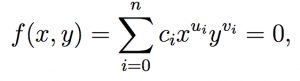
Algebraic curve. An algebraic curve is the set of points P=(x, y) with coordinates that satisfy an algebraic equation,
Algebraic curve

 Algebraic curve

where ui and vi are integer exponents, and ci are real coefficients.

Forward kinematics. In order to draw this curve, we use an RR serial chain shown in Figure 1.  All that is needed is to coordinate the angles of this chain so its end-point P traces the curve.

RR serial chain

 Figure 1. The joints of an RR serial chain are coordinated to guide the point P along a specified curve.

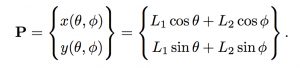
The relationship between the joint angles and the coordinates P=(x, y) is given by the forward kinematics equations of this RR chain,
RR forward kinematics

 RR forward kinematics

Kempe’s formula. In his 1876 paper, “On a general method of describing plane curvesof nth degree by linkwork,” A. B. Kempe substituted this into the equation of the curve and simplified the result to obtain,

Kempe formula

 Kempe formula

Kempe interpreted this formula to be the x-coordinate of an N link serial chain, where each link has the length Aj and is positioned at the angle,

Kempe link angles

 Kempe link angles

The end-point of Kempe’s serial chain maintains the value x=C, which means it only moves along the y-direction.

Mechanical computation. Now connect cable drives to the two joints of the RR chain so they can be used as inputs to N mechanical computers that calculate the Psij angular values.  The output of the mechanical computers are connected by cable drives to the joints of Kempe’s serial chain.

The operations needed in the mechanical computers are simply multiplication and addition.  Multiplication of an angle by a given factor is achieved by using a cable drive with the ratio of the pulley sizes set to the specified factor.  The sum of two angular values is achieved using a bevel gear differential.

The result is a mechanical system that constrains the angles of an RR chain so it draws the specified algebraic curve within the workspace of RR serial chain.

Elliptic cubic curve. As an example, consider the elliptic cubic curve,

Elliptic cubic curve

 Elliptic cubic curve

Let the RR chain have link lengths L1=L2=1, and obtain Kempe’s formula for this curve,

Elliptic cubic formula

 Elliptic cubic formula

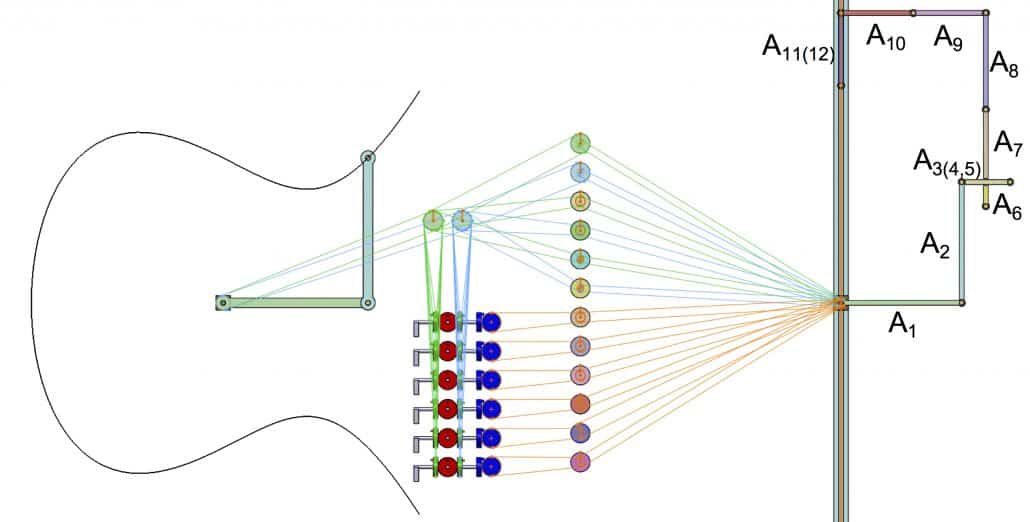
This equation has 12 terms, so Kempe’s serial chain has 12 links. The 12 mechanical computers connecting the angles of Kempes serial chain to the driving joints for the RR chain, include six additions and eight multiplications, Figure 2.
Elliptic curve drawing

 Figure 2. The Kempe’s serial chain and the mechanical computations that constrain the RR serial chain to draw an elliptic cubic curve.

Rather than use differentials and cable drives, Kempe used linkages to perform the mechanical computations and couple the results. The outcome is a lot of links as can be seen in this animation provided by Alex Kobel.

http://www.a-kobel.de/kempe/animations/x3-x-y2+1.mp4
Tags: design innovation
Share this entry
  • Share on Facebook
  • Share on X
  • Share on Pinterest
  • Share on LinkedIn
  • Share on Tumblr
  • Share on Vk
  • Share on Reddit
  • Share by Mail
https://mechanicaldesign101.com/wp-content/uploads/2016/08/Elliptic-M5.jpg 810 1600 Prof. McCarthy https://mechanicaldesign101.com/wp-content/uploads/2016/07/mechanical-design-101LOGOf.png Prof. McCarthy2016-08-03 16:34:322017-04-14 13:51:14Mechanical computation and algebraic curves
You might also like
JPL’s ATHLETE Rover Walks, Rolls, and Slides
Bernie Roth Bernard Roth: The Achievement Habit
Fourbar Extrusion A four-bar linkage provides a shape changing extrusion die
Wearable Robotics Put Spring in Your Step
SIAM News SIAM News: Biologically inspired linkage design
MotionGen Horse Motion Gen Linkage Design App

Search

Search Search

Recent Blog Posts

  • Innovative Car Door Linkage
  • Spherical Linkage Opening a Jewelry Box
  • Red Lines, Part 6
  • Red Lines, Part 5
  • Red Lines, Part 4
  • Exponential Threat, Part 4
  • Exponential Threat, Part 3
  • Red Lines, Part 3
  • ZotSun: UCI Entry in the Formula Sun Grand Prix
  • UCI Anteater Baja Racing: Five Months to the Competition

Post Categories

  • Automotive Information
  • Bored Robot
  • Chop wood carry water
  • Commentary
  • Creative
  • Design Innovation
  • Energy and Environment
  • Engineering Data
  • Fabrication
  • Give Me Space
  • Kinematic Synthesis
  • Kinematics
  • Lecture Notes
  • Linkage Animations
  • Racecar Engineering
  • Red Lines
  • Robotics Information
  • Smitty and the Professor
  • Student Projects
  • Superluminal
  • UCI Energy Invitational
  • Uncategorized

Events Calendar

August 2016
S M T W T F S
 123456
78910111213
14151617181920
21222324252627
28293031  
« Jul   Oct »

Project-based Learning (links)

  • Energy Invitational
  • Performance Engineering
  • Smitty and the Professor
  • The California Challenge
  • Theoretical Kinematics
© Copyright - Mechanical Design 101
Web Design by Lucky 19
  • Link to Facebook
Link to: Trifolium using contra-parallelograms Link to: Trifolium using contra-parallelograms Trifolium using contra-parallelogramsTrifolium Contra-parallelograms Link to: Motion Gen Linkage Design App Link to: Motion Gen Linkage Design App MotionGen HorseMotion Gen Linkage Design App
Scroll to top Scroll to top Scroll to top